Web Development


Concepts
Rest API Basics

Client - Server via Proxy
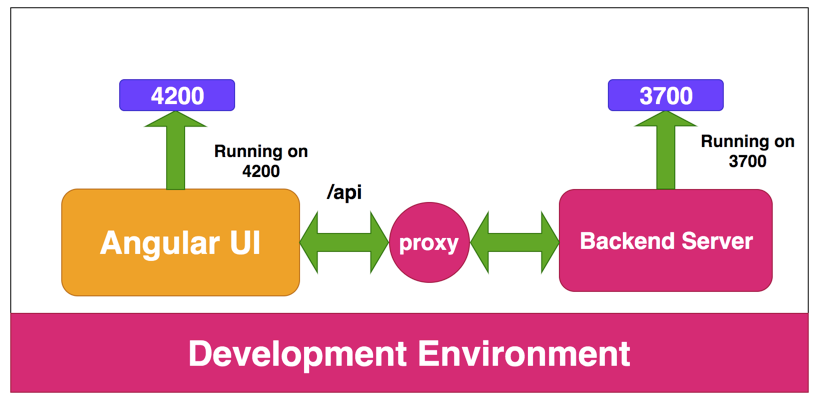
UI
Backend
Ideal Web Architecture
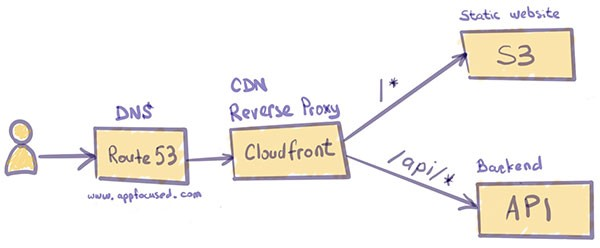
Let's Develop
Pre-requisites
| Package | Steps |
|---|---|
| Node JS | https://nodejs.org/en/ |
| NestJS | npm install -g @nestjs/cli |
Setup Project
mkdir nest-react
cd nest-react
npm install -D turbo
mkdir apps
cd apps

# Initialize a NestJS Project
nest new api

# Initialize React Client using Vite
npm create vite@latest client
{
...,
"workspaces": [
"apps/*"
]
}Setup Turbo
{
    "$schema": "https://turborepo.org/schema.json",
    "pipeline": {
        "dev": {
            "cache": false
        }
    }
}
Create turbo.json at root
{
    ...
    "scripts": {
    	"dev": "turbo run dev"
    }
}
add scripts section in root package.json
Ensure api and client have "dev" stage in scripts within package.json
Setup Proxy For Local Development
React UI
5173
NestJS API
3000
/api/*
export default defineConfig({
  plugins: [react()],
  server: {
    proxy: {
      '/api': {
        changeOrigin: true,
        target: 'http://localhost:3000',
      },
    },
  },
});
client/vite.config.js
Install Chakra UI
npm install @chakra-ui/react @emotion/react @emotion/styled framer-motion -w apps/clientRun the command from the root. It targets the client using the -w (workspace) option
import React from 'react';
import ReactDOM from 'react-dom/client';
import App from './App';
import './index.css';
import { ChakraProvider } from '@chakra-ui/react';

ReactDOM.createRoot(document.getElementById('root')).render(
  <React.StrictMode>
    <ChakraProvider>
      <App />
    </ChakraProvider>
  </React.StrictMode>
);
main.jsx
server: {
    watch: {
      usePolling: true,
    },
    proxy: {
      '/api': {
        changeOrigin: true,
        target: 'http://localhost:3000',
      },
    },
},
vite.config.js
UI Setup
Clean up the unwanted files / assets/ css and remove its references
npm install react-router-dom -w apps/clientimport { BrowserRouter as Router, Routes, Route } from 'react-router-dom';
import Home from './Home';
function App() {
return (
<Router>
<Routes>
<Route path="/" element={<Home />}></Route>
</Routes>
</Router>
);
}
export default App;
App.jsx
import React from 'react';

function Home() {
  return <div>Home Page</div>;
}

export default Home;
Home.jsx
Layout
IMG
IMG
300
300
BUY
BUY
Card
import { Button, Image, Text, VStack } from '@chakra-ui/react';
import React from 'react';

const Card = ({ amount, img, checkoutHandler }) => {
  return (
    <VStack>
      <Image src={img} boxSize={32} objectFit={'cover'}></Image>
      <Text>₹{amount}</Text>
      <Button onClick={() => checkoutHandler(amount)}>Buy Now</Button>
    </VStack>
  );
};

export default Card;
apps/client/src/Card.jsx
Home
import { Box, Stack } from '@chakra-ui/react';
import React from 'react';
import Card from './Card';

const Home = () => {
  const checkoutHandler = async (amount) => {
    console.log('Payment Handling here....');
  };

  return (
    <Box>
      <Stack
        h={'100vh'}
        alignItems="center"
        justifyContent={'center'}
        direction={['column', 'row']}
      >
        <Card
          amount={250}
          img="https://m.media-amazon.com/images/I/4125d5RJ+zL.jpg"
          checkoutHandler={checkoutHandler}
        ></Card>
        <Card
          amount={655}
          img="https://m.media-amazon.com/images/I/61N2a92STML._AC_UL480_FMwebp_QL65_.jpg"
          checkoutHandler={checkoutHandler}
        ></Card>
      </Stack>
    </Box>
  );
};

export default Home;
API Development
Create Product Resources in apps/api
nest g resource products --no-specproducts = [
{
id: 1,
amount: 250,
image: 'https://m.media-amazon.com/images/I/4125d5RJ+zL.jpg',
},
{
id: 2,
amount: 655,
image:
'https://m.media-amazon.com/images/I/61N2a92STML._AC_UL480_FMwebp_QL65_.jpg',
},
];Product Service
Integrate Products API
import { Box, Stack } from '@chakra-ui/react';
import React, { useEffect, useState } from 'react';
import Card from './Card';

const Home = () => {
  const checkoutHandler = async (amount) => {
    console.log('Payment Handling here....');
  };

  const [products, setProducts] = useState([]);

  useEffect(() => {
    fetch('/api/products')
      .then((res) => res.json())
      .then((data) => {
        console.log(data);
        setProducts(data);
      })
      .catch((err) => console.error(err));
  }, []);
Integrate Products API
  return (
    <Box>
      <Stack
        h={'100vh'}
        alignItems="center"
        justifyContent={'center'}
        direction={['column', 'row']}
      >
        {products.map((product) => (
          <Card
            key={product.id}
            amount={product.amount}
            img={product.image}
            checkoutHandler={checkoutHandler}
          ></Card>
        ))}
      </Stack>
    </Box>
  );
};

export default Home;
Iterate over the Products
Payment Integration
with RazorPay
Implementation
cd apps/api
npm install razorpay
nest g module payments
nest g controller payments --no-spec
nest g service payments --no-spec
{
  "compilerOptions": {
    "module": "commonjs",
    "declaration": true,
    "removeComments": true,
    "emitDecoratorMetadata": true,
    "experimentalDecorators": true,
    "allowSyntheticDefaultImports": true,
    "target": "es2017",
    "sourceMap": true,
    "outDir": "./dist",
    "baseUrl": "./",
    "incremental": true,
    "skipLibCheck": true,
    "strictNullChecks": false,
    "noImplicitAny": false,
    "strictBindCallApply": false,
    "forceConsistentCasingInFileNames": false,
    "noFallthroughCasesInSwitch": false,
    "esModuleInterop": true
  }
}
tsconfig.json
Checkout
import { Injectable, Logger } from '@nestjs/common';
import Razorpay from 'razorpay';
import { Orders } from 'razorpay/dist/types/orders';
import { CheckoutDto } from './dto/checkout.dto';

@Injectable()
export class PaymentsService {
  private instance: Razorpay;
  private logger = new Logger(PaymentsService.name);

  constructor() {
    this.instance = new Razorpay({
      key_id: 'x',
      key_secret: 'x',
    });
  }

  async checkout(checkoutDto: CheckoutDto): Promise<Orders.RazorpayOrder> {
    const options = {
      amount: checkoutDto.amount * 100, // amount in the smallest currency unit
      currency: checkoutDto.currency,
    };
    const order = await this.instance.orders.create(options);
    this.logger.log(`Order created: result: ${JSON.stringify(order)}`);
    return order;
  }
}
Checkout
import { Body, Controller, Logger, Post } from '@nestjs/common';
import { CheckoutDto } from './dto/checkout.dto';
import { PaymentsService } from './payments.service';

@Controller('payments')
export class PaymentsController {
  private logger = new Logger(PaymentsController.name);
  constructor(private readonly paymentService: PaymentsService) {}

  @Post('/checkout')
  async checkout(@Body() checkoutDto: CheckoutDto) {
    this.logger.log(checkoutDto);
    return await this.paymentService.checkout(checkoutDto);
  }
}
payments.controller.ts
export class CheckoutDto {
  amount: number;
  currency: 'INR';
}
dto/checkout.dto.ts
Verify
 import crypto from 'crypto';

 async verify(verifyDto: VerifyDto) {
    const body =
      verifyDto.razorpay_order_id + '|' + verifyDto.razorpay_payment_id;

    var expectedSignature = crypto
      .createHmac('sha256', this.secret)
      .update(body.toString())
      .digest('hex');
    console.log('sig received ', verifyDto.razorpay_signature);
    console.log('sig generated ', expectedSignature);
    var response = { signatureIsValid: 'false' };
    if (expectedSignature === verifyDto.razorpay_signature) {
      response = { signatureIsValid: 'true' };
    }
    return response;
  }
payments.service.ts
export class VerifyDto {
  razorpay_order_id: string;
  razorpay_payment_id: string;
  razorpay_signature: string;
}
dto/verify.dto.ts
Verify
  @Post('/verify')
  @Redirect('http://localhost:5173/payments/success', 302)
  async verify(@Body() verifyDto: VerifyDto) {
    this.logger.log(verifyDto);
    const res = await this.paymentService.verify(verifyDto);

    if (res.signatureIsValid) {
      return {
        url: `http://localhost:5173/payments/success?payment_id=${verifyDto.razorpay_payment_id}`,
        statusCode: 302,
      };
    } else {
      return {
        url: `http://localhost:5173/payments/failure?payment_id=${verifyDto.razorpay_payment_id}`,
        statusCode: 302,
      };
    }
  }
payments.controller.ts
Order Creation - UI
 const checkoutHandler = async (amount) => {
    console.log('Payment Handling here....');
    const { data } = await axios.post('/api/payments/checkout', {
      amount,
      currency: 'INR',
    });
    console.log(data);
  };
apps/client/Home.jsx
Open Payment
<script src="https://checkout.razorpay.com/v1/checkout.js"></script>
Add the script in index.html after Body tag
Verify it has loaded by console logging the window object
Checkout Handler
 const checkoutHandler = async (amount) => {
    console.log('Payment Handling here....');
    const { data } = await axios.post('/api/payments/checkout', {
      amount,
      currency: 'INR',
    });

    var options = {
      key: 'x', // Enter the Key ID generated from the Dashboard
      amount: amount, // Amount is in currency subunits. Default currency is INR. Hence, 50000 refers to 50000 paise
      currency: 'INR',
      name: 'Web Development', //your business name
      description: 'Workshop Course',
      image:
        'https://cdn.hashnode.com/res/hashnode/image/upload/v1675013183704/WDAIbjSKk.JPG?w=400&h=400&fit=crop&crop=faces&auto=compress,format&format=webp',
      order_id: data.id, //This is a sample Order ID. Pass the `id` obtained in the response of Step 1
      callback_url: '/api/payments/verify',
      prefill: {
        name: 'John doe', //your customer's name
        email: '[email protected]',
        contact: '9000090000',
      },
      notes: {
        address: 'Razorpay Corporate Office',
      },
      theme: {
        color: '#3399cc',
      },
    };
    var rzp1 = new Razorpay(options);
    rzp1.open();
  };
Add Payment Success Route
function App() {
  return (
    <Router>
      <Routes>
        <Route path="/" element={<Home />}></Route>
        <Route path="payments/success" element={<PaymentSuccess />}></Route>
      </Routes>
    </Router>
  );
}
App.jsx
Payment Success
import { Box, Heading, Text, VStack } from '@chakra-ui/react';
import React from 'react';
import { useSearchParams } from 'react-router-dom';

const PaymentSuccess = () => {
  const searchQuery = useSearchParams()[0];
  const paymentId = searchQuery.get('payment_id');
  console.log('payment success');
  return (
    <Box>
      <VStack h="100vh" justifyContent={'center'} alignContent="center">
        <Heading textTransform={'uppercase'}> Order Successfull</Heading>
        <Text>PaymentId: {paymentId}</Text>
      </VStack>
    </Box>
  );
};

export default PaymentSuccess;
PaymentSucces.jsx